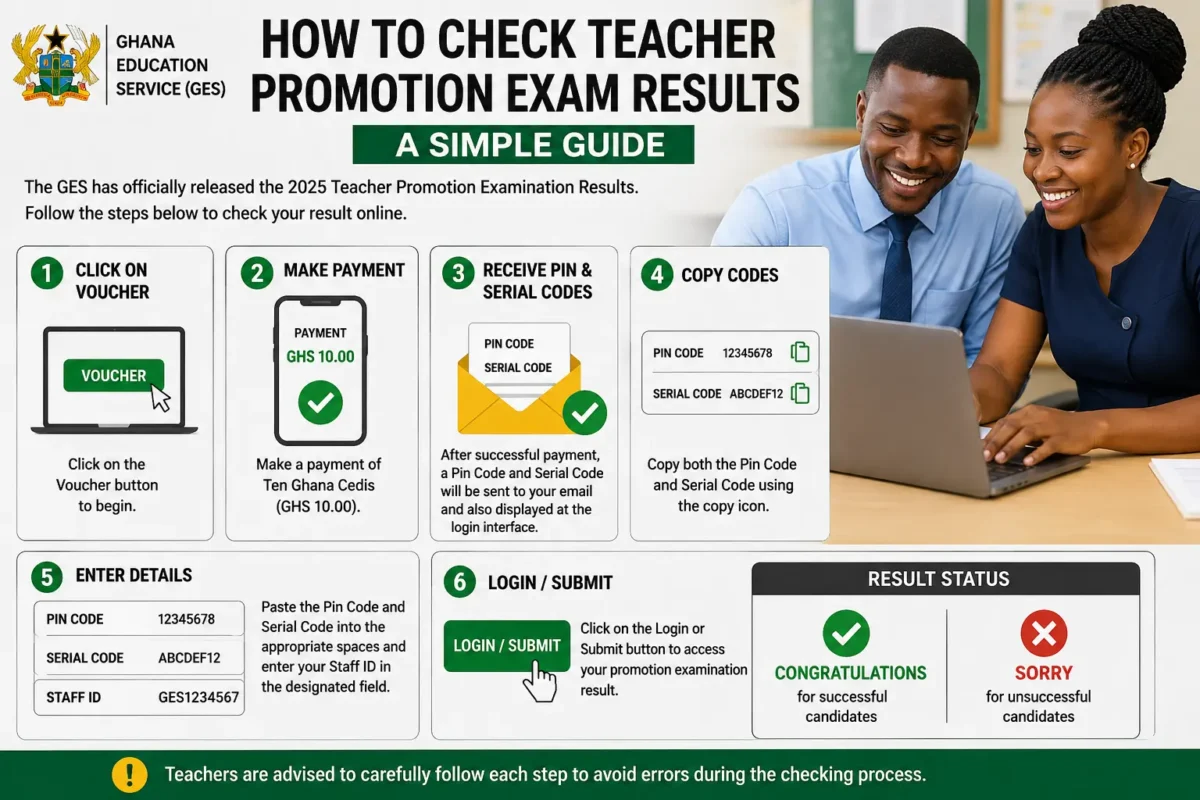
The Ghana Education Service (GES) has officially released the 2025 Teacher Promotion Examination Results for all candidates who participated in the promotion exams across the country. Teachers who sat for the examination can now conveniently check their results online by following a few simple steps.
To begin the process, candidates are required to click on the Voucher button and make a payment of Ten Ghana Cedis (GHS 10.00). After the payment has been successfully approved, a Pin Code and Serial Code will be generated and sent to the email address provided during the payment process. These details will also appear at the login interface, where candidates can easily copy them using the copy icon provided.
Applicants should carefully copy both the Pin Code and Serial Code and paste them into the appropriate spaces on the result-checking portal. After entering the required details, candidates must also provide their Staff ID in the designated field.
Finally, click on the Login or Submit button to access your promotion examination result. Your result status will then be displayed, indicating either “Congratulations” for successful candidates or “Sorry” for unsuccessful candidates. Teachers are advised to carefully follow each step to avoid errors during the checking process.
Keep following GH Educate for more credible news and updates
Kindly share with others